Control your Kids Screen Time and Access on Windows 10 and Xbox
We love tech, and we love our PC’s, but even us Webafricans understand that our kids need to spend time offline. Whether it’s to go outside for some...
We love tech, and we love our PC’s, but even us Webafricans understand that our kids need to spend time offline. Whether it’s to go outside for some exercise, read a book or play an instrument, we know there is a lot that they can only learn in the real world. We also know that it can be pretty difficult to get them off that screen once they’ve plugged in – or if we’re not at home.
What’s more is that we know that there is a lot of content online that we don’t want our kids to stumble across. With our email and credit card details saved on Google there is a lot of scope for them accidentally sign up for things, buy stuff or cause all kinds of chaos if left online unattended for a moment.
(Please Note: You should not leave your children unattended online. This article is meant to help you to control their online environment, not to replace you as a judicious parent.)
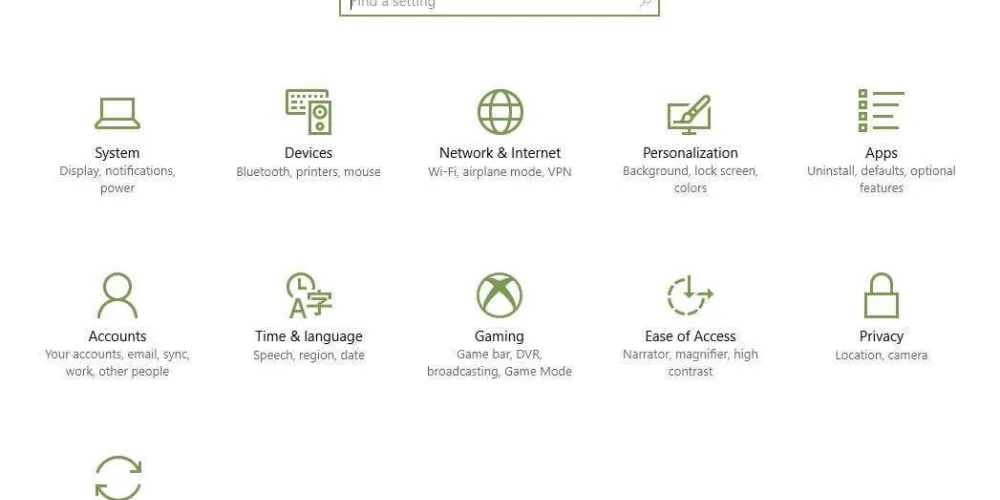
Luckily Windows 10 allows you to set your kid’s screen time hours and their access. Check it out.
- Head to your Start Bar and find the “Settings” Button.
- Select your “Accounts”.
- Find and Select “Family and other people”.
- You will need to set up a child account (if you haven’t already done so) then go to “manage family settings online”.
- Under your child’s account, select the option labelled “Screen Time”.
- Select the hours you are willing to allow them to be online, both for PC and for Xbox.
- Now toggle to the tab labelled “Content Restrictions”.
- Here you can limit what they see online.
- You can navigate around this section to set all kinds of parameters, including adding money (and limits on that money) for them to use online, for example in their games.
- Save your settings and voila! You’re done!
We recommend spending some time in these settings and investigating all of the parameters you can set up for your kids. After all, parenting is all about setting loving boundaries!
Loved the read? Get the speed to match.
Check Fibre & Fixed Wireless coverage at your address in seconds.
More in Life Hacks
View all →
Level up your game with Fibre that can keep up
Every dropped packet. Every endless loading screen. Every disconnect right before you clutch the win. It’s frustrating. When you’re gaming online, milliseconds matter...

UPS: Stay online even when Eskom’s left you in the dark…
Power cuts can be a frustrating experience – the Netogy UPS 100 can help you change that! Ever forget about load shedding or have an unplanned power outage...